See the map and checklist workspace
What does the Crimson Forest map guide cover?
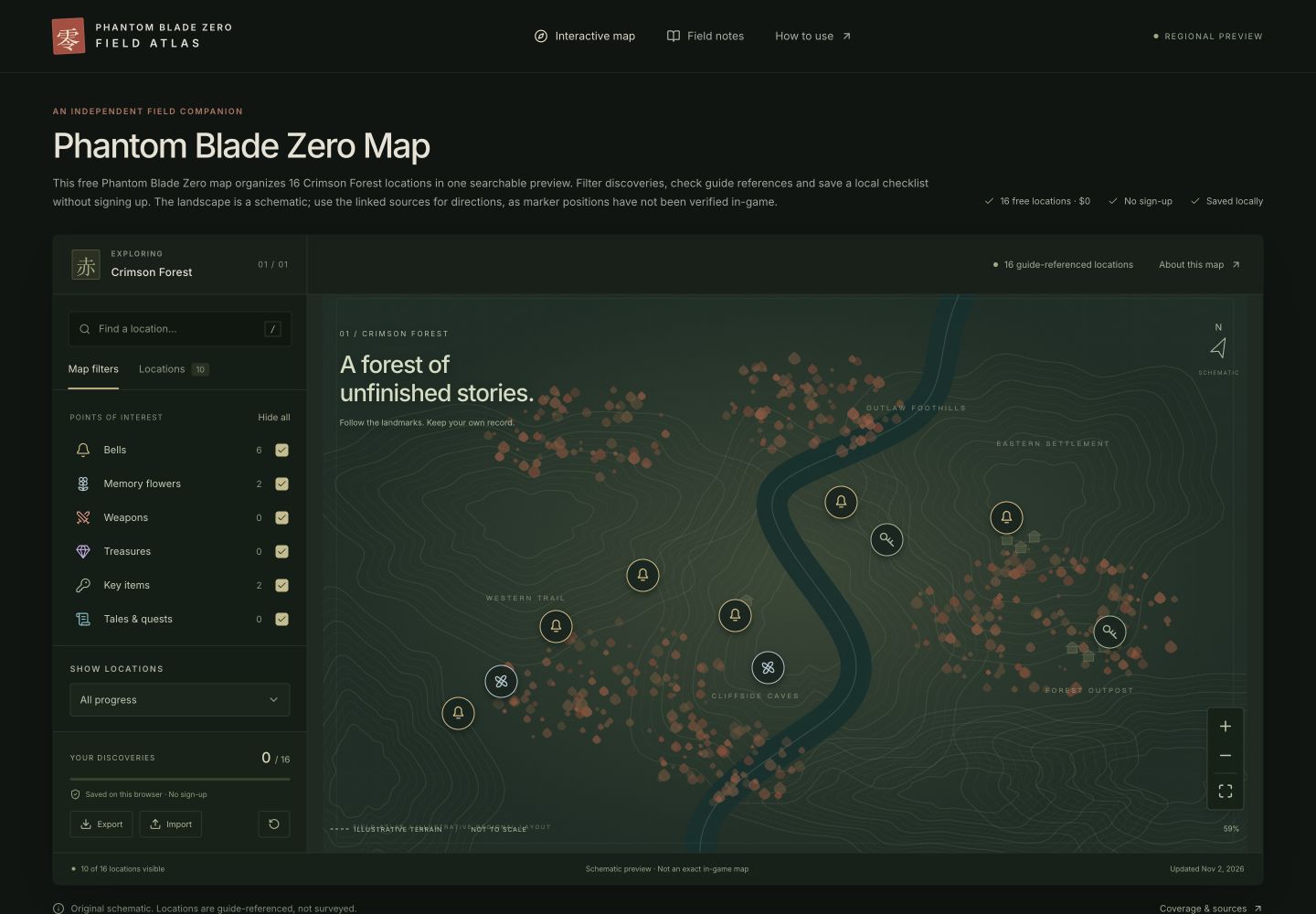
The preview is a small reference workspace for one region. It combines a schematic landscape, searchable location records and a personal checklist. The sixteen entries are the scope of this release, not the number of collectibles in the game. Completing this checklist should never be interpreted as completing the region.
Every record includes a source link. That makes it possible to inspect the published context behind a short note instead of relying on an unexplained marker. The artwork was created for this site; no surveyed coordinates were supplied. Treat relative marker placement as an interface demonstration, not a route, distance measurement or statement about elevation.
How should I start using the map?
Open the Crimson Forest map and choose a category relevant to your current goal. You can combine categories or hide them individually. Starting with a small visible set makes it easier to check how filtering works before expanding the view. The category counts describe this preview under the current story setting.
If you know a location name, type part of it in Search locations. Search also checks the category and area label. It works together with the active categories and progress filter, so a matching name can still be excluded by another setting. Reset filters if the results are unexpectedly empty, then review the story switch separately.
The Locations tab gives you the same results as a list. Select a row to open its card and focus the schematic. This is especially useful with a keyboard or on a small screen. On mobile, open Filters first, choose the record and let the panel close so the map has room.
What should I check on a location card?
Read the name, short note and Before you go requirement together. The requirement is a reminder to inspect access conditions; it is not a promise that your current save can reach the location. Follow Read the source guide for the original explanation and any context beyond this small preview.
A guide reference and an exact position are different kinds of evidence. This release has the former and does not claim the latter. A marker placed close to another marker on our drawing does not establish a connection between them in the game. When a source and this preview differ, keep the discrepancy in a correction report rather than assuming the drawing is authoritative.
How do I record and protect discoveries?
Choose Mark as found after deciding that you want the record checked off. You can undo it from the same card. The progress bar counts records in this preview, including story-sensitive records that may currently be hidden. Already found and Not found yet let you review either side of your checklist.
Found identifiers are saved in this browser’s local storage. There is no account, cloud backup or game-save import. A different browser or device has a separate copy. Clearing site data may remove the checklist, so export a JSON backup before changing devices or resetting browser storage.
Import merges a valid backup with existing discoveries. It checks the version, region and identifiers before accepting a file. An unrelated JSON document will not replace your progress. Export again after a successful merge if you want one backup containing discoveries from both browsers.
Can I share a location without sharing my checklist?
Copy location link creates a URL with a location identifier. It does not include your found markers. The recipient opens that record with their own local progress. A story-sensitive shared record stays behind a reveal prompt until the recipient chooses to show it.
Keep Story locations off if you want the main map and result list to omit flagged encounters and rewards. This control applies to those interactive surfaces. The expandable reference table is separately labelled as containing spoilers; do not open that index if you want to avoid its names. Source websites have their own spoiler practices.
How can this preview become more useful?
Corrections are most useful when they identify one record, state what appears wrong and include evidence that someone else can inspect. A version or platform difference can matter, so include that context when it is known. Avoid submitting an entire copied guide when a source link and a short explanation will do.
The Sources page documents coverage and verification limits. The Contact page currently prepares a downloadable correction draft; it does not send messages to an operator. An actual public contact channel and verified geographic data are still needed before this preview can become a dependable published atlas.